Time Machine Join the waitlist

Your agent broke it. Get back the version that passed.

Time Machine saves your project before Claude Code acts, checks each save point with your own tests, and brings back the newest one that passes.

Joining means we write to you when the CLI is on npm, nothing else. We store your email, your consent, the page and time you joined, and referral codes. Never your IP address, only a one-way code kept about an hour to limit requests. Privacy (draft)

See how it works Install from source Works on macOS and Linux. Needs Node 22 and Git.

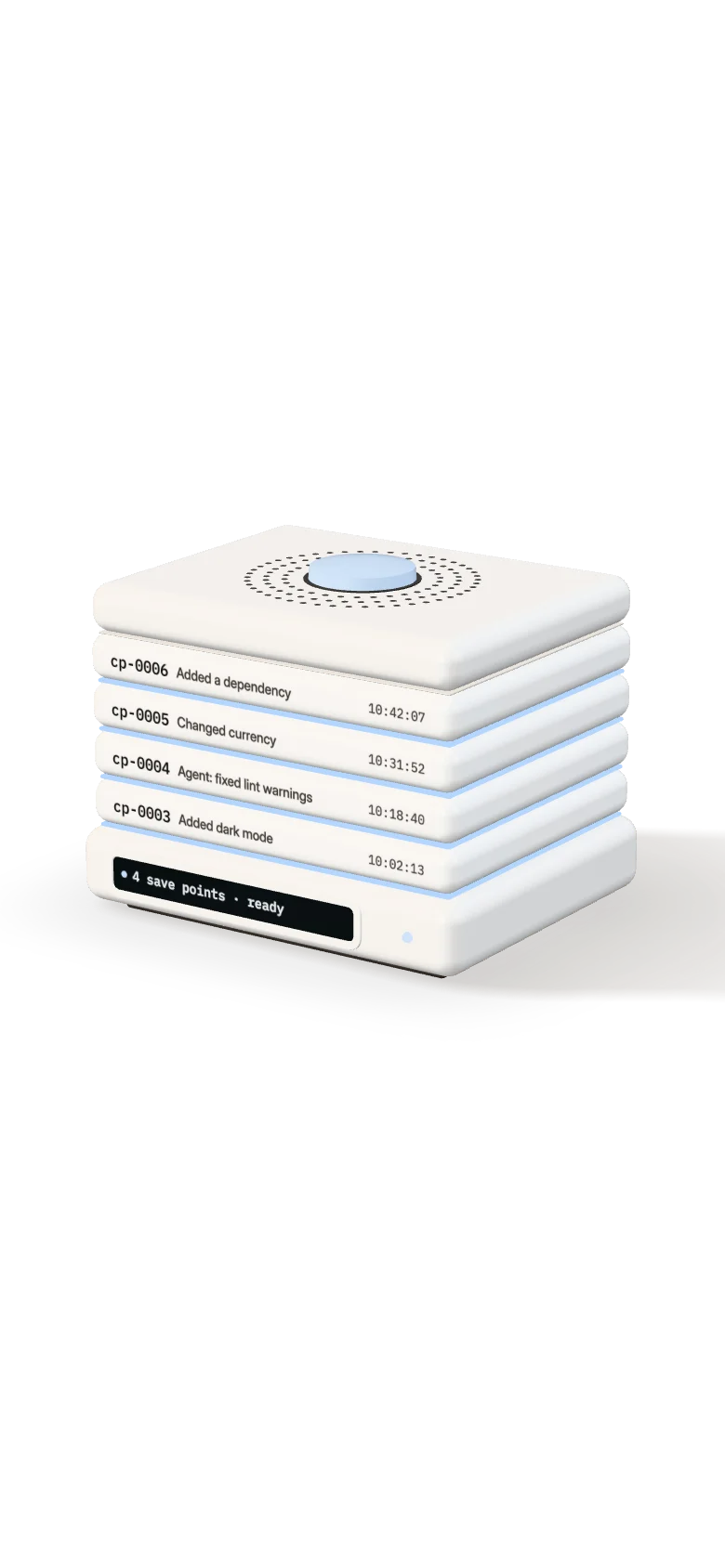
The machine opened into its save points. The top three layers have red seams: cp-0006, cp-0005 and cp-0004 failed their tests.

Every save point, checked. With your own tests.

cp-0006, cp-0005 and cp-0004 failed their tests.

The bottom layer, cp-0003, has a green seam: it passed its tests.

This one passed. Added dark mode.

cp-0003 · passed its tests, in a separate copy

Layer cp-0003 slides out of the stack towards you while the others close back up.

Bring it back. Keep your work.

On branch tm/recover/cp-0003, in a separate copy. Your folder stays as it is.

Find the last version that passed.

A real tm demo run, replayed. Its project broke at cp-0004, when an agent fixed some lint warnings. Find checks the save points the way tm find-good does: newest first, stopping at the first one that passes. Bring back puts that one on a new branch, next to your folder.

  1. cp-0006 FAIL Added a dependency
  2. cp-0005 FAIL Changed currency
  3. cp-0004 FAIL Agent: fixed lint warnings
  4. cp-0003 PASS Added dark mode. Brought back on tm/recover/cp-0003.

Illustration. Save points, verdicts and output are from a real tm demo run on a synthetic project. Arrow keys move between save points.

The web app

Open it with tm ui. It runs on your computer, in your browser. Nothing is hosted, and you don’t need an account to use it.

  1. 1

    Add your project and pick the check

    Point the web app at your project folder. It guesses the command that shows your project works, such as npm test, and you confirm it.

    The web app's first screen, before any project is added. It offers two buttons: Try the demo and Add a project.
    Real screen, synthetic project.
  2. 2

    See which versions work and which broke

    Every agent turn gets a save point, a copy of your project made before each request to the AI and before risky commands. The history shows plainly which ones work and which are broken, and the last one that worked.

    Works
    Your own tests ran on it in a separate copy and passed.
    Broken
    Your tests ran on it and failed.
    Couldn’t check
    Something saved is missing, or setup failed, so the check did not run.
    Not checked yet
    Saved, but not checked. Never shown as working.
    The history screen lists each save point with its verdict. The newest is broken. An earlier one works, and a Go back button leads to it.
    Real screen, synthetic project.
  3. 3

    Rewind to the last version that works, in a separate copy

    Before anything happens, you see what comes back and what does not, like passwords or your database. The good version then comes back next to your work. Your current folder stays as it was, so nothing is lost, and you can undo the rewind.

    The rewind screen shows the save point that passed, what comes back, the secret values and database contents that do not, and the button that brings it back as a separate copy.
    Real screen, synthetic project.

How it is built

Four drawings of what happens on your computer when Time Machine saves, checks and brings a version back, and of what reaches the internet. Each sheet names the source file it shows.

An exploded drawing of one save point as five stacked layers: the project, the commit, the blobs, the sealed manifest and the Git bundle, with secrets kept out to the side.

Sheet 1 of 4

A save point

Made before each prompt, before a risky shell command and after each agent turn. Your files, index and branch stay as they are.

  1. Your project: tracked files with edits you have not committed, and new files Git does not track yet.
  2. A commit pinned at refs/tm/cp-0004, made through a temporary Git index.
  3. Files Git does not track, stored as SHA-256 named, gzipped, read-only blobs in objects/. Over 5 MB is skipped unless you raise the limit.
  4. The manifest checkpoints/cp-0004.json, written once and sealed with HMAC-SHA256. The key never leaves your computer.
  5. A Git bundle, bundles/cp-0004.bundle, so the save point survives the project folder being deleted.
  6. Never stored: secret files such as .env and *.pem, and secret values. Config keys keep only a name and a fingerprint.
Source
packages/core/src/checkpoint.ts
Store
~/.timemachine/projects/<id>/
The check: a save point is built in a temporary copy, setup runs with the network on, your command runs under the network policy, and its exit code becomes one of five verdicts written to a signed log. Your folder sits apart, untouched.

Sheet 2 of 4

The check

Your own command runs on the save point in a temporary copy. Its exit code becomes the verdict.

  1. git worktree add --detach builds the save point in a temporary folder, removed afterwards. Your working copy, index and branch are not touched.
  2. A clean environment, with PATH, HOME and a few more, plus CI=1. A 600 second timeout by default.
  3. verify.setup, such as npm ci, runs first, with the network on.
  4. Your verify.command, such as npm test. The network is allowed by default.
  5. With network: deny, the command runs under sandbox-exec on macOS or bwrap / unshare on Linux. With no sandbox the verdict is BLOCKED, and the check does not run.
  6. The verdict and tm’s exit code: PASS 0, FAIL 1, INCOMPLETE 2, BLOCKED 3, ERROR 4. Each one is signed and appended to verdicts.jsonl.
Source
packages/core/src/verify.ts, sandbox.ts
Config
timemachine.yml
The rewind as a Git graph: six save points on the main line, the current state saved first as a seventh, a new branch growing from the save point that passed, and a recovery copy folder next to the untouched project folder. A cloud for pushing is crossed out.

Sheet 3 of 4

The rewind

The newest save point that passes comes back next to your work, never in place of it.

  1. Your current state is saved first, as a new save point: cp-0007 in the demo.
  2. A local branch, tm/recover/cp-0003, at that save point’s commit.
  3. A recovery copy in the folder next to yours, marigold-tips-recovered-cp-0003.
  4. Your folder and your branch are not touched. Nothing is pushed, merged or deployed.
  5. Undo removes the copy and the branch, only if neither has changed since. It never removes a save point.
  6. Every report lists what did not come back: database contents, deployed versions and secret values.
Source
packages/core/src/recover.ts
Command
tm recover cp-0003
What runs where: inside a dashed line for your computer, Claude Code calls three hooks into the tm CLI; the CLI, the MCP server and the local web app server all call one engine, which writes to the store. Outside, two optional services, Google Gemini and the Vercel API. Below, the website with its functions and database, not connected to your computer.

Sheet 4 of 4

What runs where

All of the above runs on your computer. Two optional features of the web app reach the internet, and only after you turn them on.

  1. Claude Code calls three hooks from .claude/settings.json: before each prompt, before a risky Bash command, and when its turn ends.
  2. The tm CLI, the MCP server and tm ui call one engine, packages/core. The engine makes no network calls.
  3. The store, ~/.timemachine, sits outside your project.
  4. tm ui listens on 127.0.0.1 only. Your browser gets a random 32-byte token in the URL fragment, and the server checks Host and Origin.
  5. Optional: Ask sends a short history summary to Google Gemini with your own key, never file contents or logs. Vercel deploy lookups only read.
  6. This website is separate: Vercel functions and a Supabase database for the waitlist. Nothing on your computer calls it, and a license key is checked offline.
Source
packages/cli/src/ui/server.ts, core/src/hooks.ts
Backend
site/api/, Supabase tm_waitlist

More than a commit comes back

A save point is a Git commit pinned under refs/tm, plus a Git bundle in a store outside your project, plus what Git alone would miss. Every recovery report lists both columns, in these words.

Comes back

  • Your code, with uncommitted edits. The commit is made from your working tree, so edits you had not committed yet are in it. Code at commit a1b2c3d
  • Files not in Git. New files you had not added yet, up to a size limit you set. 3 saved files
  • Config, by key name. Keys you allowlist come back with their values. Every other key is kept as its name and a fingerprint, so you can tell what changed without the value ever being stored. Config: PORT
  • Lockfiles. package-lock.json, pnpm-lock.yaml, yarn.lock, Cargo.lock and similar, even when your .gitignore skips them, checked byte for byte against their recorded digests. Dependencies: package-lock.json
  • Environment definition files. Dockerfile, docker-compose.yml, .devcontainer/devcontainer.json and similar when Git has them. Version pins like .nvmrc and .tool-versions also when ignored. All checked against their digests. Environment definition: Dockerfile, .nvmrc
  • A Git bundle in the store. Kept in ~/.timemachine, so the save point survives the project folder being deleted. Runtime versions such as Node and Git are recorded and shown in a compare, not restored.

Does not come back

  • Secret values. Values from config files like .env are never stored, not even on your own computer, only key names and a fingerprint. The report names the keys you set again by hand. Secret values in .env: STRIPE_SECRET_KEY
  • Files that look like secrets. An edited tracked file that looks like it holds a secret keeps its last committed version instead. A file named like a secrets file is not saved. .env.local is a secrets file by name, so it was not saved
  • Files your .gitignore skips. Folders like node_modules or build output, unless you ask for them. Files your .gitignore skips were not saved: dist
  • Database contents, deployed versions and external services. Emails sent, payments made, anything on a server. Databases, deployed versions and external services are not captured

Every report ends with the same line: Restored: code, captured files, config. Not restored: database, deployed version, secret values. An unchecked save point is shown as not checked, never as working.

Why not Claude Code’s rewind or Git

Time Machine runs your own tests on each save point in a separate copy. It brings the working one back on a new branch without touching your folder, and lists what did not come back.

Scroll the table sideways or use the arrow keys to compare all three.

What Claude Code’s rewind, Git and Time Machine each do
CapabilityClaude Code rewindGitTime Machine
Files changed by shell commands like rmOnly in files Claude also editedOnly what you committedSaved before each prompt and before commands like rm -rf
Saves automatically while the agent worksYesNo, you commitYes, with Claude Code hooks
Tells you which version passes your testsNoNo, you test by handYes, each in a separate copy
Going back leaves your current work aloneRestores in placeDepends on the commandNew branch and a copy
Lists what didn’t come backNoNoEvery time

Claude Code behavior from its checkpointing docs. Other agents are planned, not built.

Pay once

The web app is free for up to 3 projects at a time. One payment of $50 lets it list as many as you like. No subscription.

The web app

$50 once

  • The web app for as many projects as you like, on any number of your own computers.
  • Updates while we ship them.
  • A key verified offline, on your computer.
  • No subscription.
  • Refund within 14 days by email. Terms (draft)

Why pay once. No subscription to cancel, no password to keep. The web app runs on your computer, and so does the key.

The tm command line tool is open source (MIT) and stays that way. Save points, checks, find-good, recover, the Claude Code hooks and the MCP server never need a key, and restores are never behind the paywall.

For developers

The tm CLI works today on macOS and Linux. Build it from source, run the demo, then open the web app in your browser with tm ui.

In a terminal Not on npm yet

git clone https://github.com/ShadowEsu/Time-Machine.git
cd Time-Machine
pnpm install && pnpm build
npm install -g ./packages/cli
tm demo

Needs Node 22 or newer and Git. No pnpm? Run npm install -g pnpm first. Keep the Time-Machine folder. The tm command runs from it.

tm demo builds a small synthetic project in a temporary folder, breaks it, then brings back the last version that passed. Your own projects are not touched. Most of the first run is downloading and building.

Then the web app

tm ui

tm ui opens the web app in your browser. It runs on your own computer at 127.0.0.1, not on a website, so your project is never uploaded. Keep the terminal open while you use it. It is free for up to 3 projects at a time; a one-time key lifts the limit (tm license <key>, or Settings > License).

Set up with Claude Code

Open Claude Code in your project and paste this. The steps it follows are in install.md.

Read https://time-machine-site.vercel.app/install.md and set up Time Machine in this project.

  • Save points stay on your computer, in ~/.timemachine. Nothing is uploaded. The optional Ask feature in the web app sends a short summary to Google only after you turn it on.

One engine behind the app, the CLI and the hooks

The web app, the tm CLI, the Claude Code hooks and the MCP server call the same engine, so their answers always match.

  • 1

    Save points before every prompt

    Claude Code hooks save before each prompt and before risky shell commands, even when nothing is committed yet.

    Claude Code’s own rewind skips files that only shell commands changed. Time Machine saves first, outside your project folder, with a Git bundle.

    Built Claude Code hooks

  • 2

    Your tests decide: PASS or FAIL

    Each save point is checked in a separate copy.

    $ tm find-good
    cp-0004  FAIL
    cp-0003  PASS  newest that works

    Built PASS or FAIL per save point

  • 3

    Go back on a new branch

    The newest version that passes comes back.

    Your folder and current branch are never touched. Nothing is pushed, merged or deployed. Every report lists what did not come back.

    Built tm recover cp-0003

$ tm find-good
  cp-0006   FAIL   The check failed with exit code 1.
  cp-0005   FAIL   The check failed with exit code 1.
  cp-0004   FAIL   The check failed with exit code 1.
  cp-0003   PASS   The check passed.
PASS  cp-0003 is the newest version that works.

$ tm recover cp-0003
Recovery ready for cp-0003. Nothing was pushed, merged or deployed.
  Branch        tm/recover/cp-0003
  Saved first   cp-0007, your state before this recovery
Not restored
  Secret values in .env: PORT, STRIPE_SECRET_KEY
Real output of tm demo on a synthetic project, shortened.

Keep a way back while your agent works

Time Machine is not

  • A backup or a Git replacement. Keep committing, and keep a disk backup.
  • An account or a cloud service. The tm CLI and tm ui run on your computer.
  • A restore in place. You get a separate copy on a new branch.
  • Another approval prompt. The hooks save and check without asking you to approve each step.
Join the waitlist